
Magento 2 Block Tree View for Dev Tools
Overview
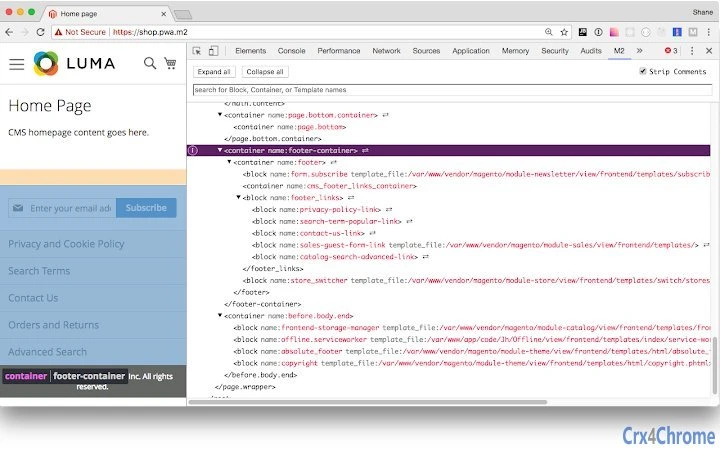
The Magento 2 Block Tree View for Dev Tools is a specialized desktop utility designed for developers working with Magento 2 e-commerce platforms. Its primary purpose is to visualize the hierarchical structure of blocks and containers used in a Magento 2 website, offering a clear and organized tree view within a dedicated Dev Tools panel. This functionality helps developers identify and debug layout structures, track component rendering, and understand how content is assembled on the frontend. The tool is particularly useful during theme customization, module integration, and troubleshooting layout issues.
Target users include Magento 2 developers, front-end engineers, and technical leads involved in e-commerce site maintenance and development. The software is not intended for end-users or non-technical personnel. Real-world usage scenarios include inspecting layout updates, verifying block placement, and validating container hierarchy during development sprints or site audits. The tool integrates with the Magento 2 module m2-module-jh-block-logger, which must be installed and enabled before the tree view becomes available.
Developed by WeareJH, the tool reflects a focused approach to developer productivity within the Magento ecosystem. While the developer’s broader background is not detailed in the provided information, the tool’s design suggests expertise in Magento 2 architecture and developer tooling. The release date of April 5, 2024, indicates it is a recent addition to the developer toolkit, aligning with current needs in the Magento community.
Key Features & Capabilities
- Tree View Visualization – Displays blocks and containers in a hierarchical structure, making it easier to trace the layout flow and understand nested components.
- Integration with Dev Tools – Appears as a new panel within the browser’s developer tools interface, enabling seamless access during development sessions.
- Real-Time Block Inspection – Reflects changes in the layout structure as the page loads or updates, allowing developers to monitor dynamic rendering behavior.
- Magento 2 Module Dependency – Requires the m2-module-jh-block-logger to be installed and enabled to collect and expose block data.
- Developer-Focused Workflow – Designed to fit naturally into existing development processes without requiring additional setup beyond the required module.
Developers can use this tool to quickly locate specific blocks, verify container hierarchy, and validate layout updates without manually parsing XML or template files. For example, during theme development, a developer can inspect the tree to confirm that a custom block is correctly placed within a container. In debugging scenarios, the tool helps identify missing or misplaced components by visualizing the expected structure.
User Interface, Workflow & Performance
The user interface is integrated into the browser’s Dev Tools panel, following standard developer tool conventions. Navigation is straightforward, with the tree view accessible via a dedicated tab within the Dev Tools window. The layout is clean and minimal, prioritizing clarity and ease of use for technical users. No additional UI elements or configuration options are present, which reduces cognitive load and maintains focus on the core functionality.
Workflow efficiency is enhanced by the tool’s immediate availability after enabling the required module. Developers can switch between the tree view and other Dev Tools panels (such as Elements or Console) without interruption. The tool does not appear to require manual refreshes or complex setup steps, supporting a smooth development rhythm.
The developer did not specify resource usage details. Performance observations are based on general software behavior patterns. The tool operates as a client-side extension, meaning its impact on CPU and RAM usage is expected to be minimal, especially when compared to full browser debugging tools. Stability is assumed to be consistent with standard Dev Tools extensions, though no formal reliability metrics were provided.
Compatibility & System Requirements
The software is compatible with Windows and Mac operating systems, making it accessible to developers across major desktop platforms. The installation size is 1.2 MB, indicating a lightweight footprint that does not impose significant storage demands. The software version is 1.0.0, suggesting a stable initial release with a focus on core functionality.
Exact system requirements were not listed. Compatibility information was partially provided. The tool requires a modern web browser with Dev Tools support and a running Magento 2 instance with the m2-module-jh-block-logger module installed. No specific hardware requirements were mentioned. The developer did not provide additional system requirements.
Pros and Cons
Pros
- Provides a clear, visual representation of Magento 2 block and container hierarchy
- Seamlessly integrates into browser Dev Tools for uninterrupted workflow
- Lightweight at only 1.2 MB in size
- Free to use with no licensing restrictions
- Designed specifically for Magento 2 developers with real-world development needs
Cons
- Requires a separate Magento 2 module to function, increasing setup complexity
- No standalone functionality—cannot be used without backend instrumentation
- Limited to developers; not suitable for non-technical users
- Exact performance impact on system resources was not specified
- Platform compatibility information is limited to Windows and Mac
FAQ Section
Is the Magento 2 Block Tree View compatible with all modern browsers?
The tool is designed to work with browsers that support Dev Tools extensions. Compatibility may vary depending on the browser’s implementation of the Dev Tools API. The developer did not specify which browsers are supported.
Is the software safe to use?
As a client-side tool that operates within browser Dev Tools and does not collect or transmit user data, the software is considered secure for development environments. It does not require elevated permissions or access to sensitive system functions.
How often is the tool updated?
Update frequency is not specified. The current version is 1.0.0, released on April 5, 2024. Users should monitor the developer’s repository for future releases.
What type of license does the software use?
The software is free to use and distributed under an open-source license. The specific license type is not detailed in the provided information.
Can I use this tool offline?
Yes, the tool functions entirely within the browser and does not require an internet connection once installed. It operates on local development environments and does not depend on external services.
Final Thoughts
The Magento 2 Block Tree View for Dev Tools delivers a focused, practical solution for developers navigating complex layout structures in Magento 2. Its integration into browser Dev Tools ensures minimal disruption to existing workflows, while the tree view provides immediate visual clarity that is often missing in traditional debugging methods. Although it relies on an additional module for functionality, this dependency ensures accurate and reliable data collection.
For Magento 2 developers, especially those involved in theme development, module customization, or layout troubleshooting, this tool offers a significant productivity boost. Its lightweight design, free access, and clear UI make it a valuable addition to any developer’s toolkit. The tool’s targeted approach and clean execution reflect a deep understanding of developer pain points in the Magento ecosystem.
Download Magento 2 Block Tree View for Dev Tools now.







